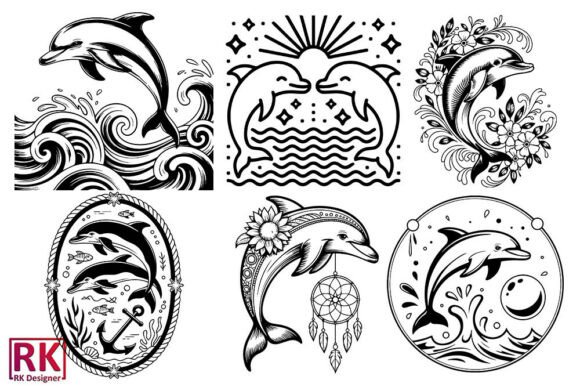
Dolphin Vector Design
A Designer’s First Glance: Clean, Friendly, and Ready for Stitching
When Dolphin Vector Design opened on my screen—SVG first, then EPS and PNG—I felt that quiet nod of recognition: this isn’t just another clipart dolphin. It’s balanced. The curves are smooth but intentional, the silhouette confident without being stiff, and the proportions lean gently toward charm rather than cartoonish exaggeration. As an embroidery designer who’s stitched hundreds of marine motifs—from playful whales to stylized seahorses—I appreciate how this one avoids visual clutter. No tiny fins tucked behind the body, no overwrought eye detail that’ll vanish in satin stitch, no unnecessary interior lines that invite fill-stitch bleed or thread breaks. It reads clearly at 3 inches wide, holds up at 5 inches, and still feels cohesive when scaled down for a baby onesie or cap front.
Where It Shines: Real Projects, Real Customers
Last week, I prepped Dolphin Vector Design for a custom embroidered tote bag order—a small-batch run for a coastal boutique launching their summer collection. The client wanted something joyful but not childish, ocean-themed but not cliché. We placed the design centered on natural canvas, sized to 4.25" wide, using a medium-weight cutaway stabilizer and soft-touch polyester thread. The result? Crisp edges, consistent satin stitch flow along the dorsal fin and tail, and zero puckering—even with the fabric’s subtle weave texture. That’s Dolphin Vector Design doing what it does best: translating cleanly from vector to stitch without demanding heroic digitizing fixes.
It works equally well on sweatshirt embroidery (the rounded shape nestles nicely into the chest pocket area), baby embroidery (gentle curves feel soothing on organic cotton onesies), and embroidered patches (its self-contained outline makes it ideal for heat-applied or sew-on versions). I’ve also used it as a focal point on tea towels and pillow covers—always with the same outcome: customers comment on how “alive” the dolphin looks, not how “designed” it feels. That’s rare. Most vector-to-embroidery transitions lose warmth; this one keeps it.
Where to Pause—and Why
That said, Dolphin Vector Design isn’t magic. On thin or highly stretchy fabrics—like lightweight jersey tees or ribbed baby caps—I recommend testing with extra stabilizer and possibly simplifying the tail curve in your embroidery software if stitch density feels too aggressive. The file set includes multiple formats (SVG, EPS, DXF, PNG at 300 DPI), which is great for flexibility—but remember: none of those tell you the actual stitch count or underlay strategy. If you’re planning commercial embroidery on curved surfaces like structured caps, open the DXF or SVG in your digitizing program first. Check how many anchor points live in tight corners—those can translate to slow-motion stitching or skipped stitches on low-tension machines.
Also, avoid placing Dolphin Vector Design near high-friction zones on finished products—think elbow patches on aprons or heel areas on baby blankets. Its graceful lines hold up beautifully on flat, stable surfaces, but repeated bending or abrasion will soften definition faster than bolder, blockier motifs.
What It Adds to Your Handmade Product—and Your Reputation
Using Dolphin Vector Design doesn’t just fill space—it elevates perception. A personalized gift with this motif reads as thoughtful, not generic. An Etsy seller listing a set of embroidered kitchen towels with Dolphin Vector Design gains instant cohesion and seasonal appeal (summer, beach weddings, new baby announcements). Small shop owners report higher engagement when Dolphin Vector Design appears in printable mockups—it photographs well on light and dark backgrounds, and its clean vector origin means crisp digital previews every time.
More subtly, it supports brand consistency. Whether you’re building a line of nursery decor or launching a surf-inspired apparel capsule, Dolphin Vector Design acts like a quiet signature—not shouting, but anchoring. Buyers recognize it across product types, which builds trust. And because it’s delivered as versatile design assets (not locked raster files), you retain full control over color, scale, and placement—critical for craft business owners juggling custom requests and inventory batches.
Practical Notes Every Embroidery Designer Should Run Through
- Test first: Always stitch Dolphin Vector Design on scrap fabric matching your final project’s weight and stretch.
- Check contrast: Try it in white thread on navy fabric and black thread on oat-colored linen—some vector outlines tighten or loosen depending on thread hue.
- Review stitch density: Especially in the curved belly and tail tip—dense fill areas may need reduced density or alternate stitch types for breathability on baby items.
- Confirm hoop size: While the design scales well, verify your machine’s largest hoop comfortably fits your intended size before hooping production runs.
- Inspect small details: Zoom in on the eye and mouth lines in your embroidery software—they should convert cleanly to running or satin stitch without collapsing.
- Mock it both ways: Use Dolphin Vector Design in black-and-white mockups to assess readability before committing to color palettes.
- Stabilizer matters: For textured fabrics like terry cloth or bouclé, pair it with tear-away + topping for clean surface definition.
- Licensing check: Since Dolphin Vector Design is sold as Graphics within Crafts, confirm whether your intended use—especially resale of finished embroidered items or digital embroidery files—falls within the provided license terms.
Final Thought: Not Just a Dolphin—A Reliable Design Partner
Dolphin Vector Design won’t solve every embroidery challenge. But it solves a very real one: finding a nature-inspired motif that stitches cleanly, sells consistently, and feels handmade—not mass-produced. It fits naturally into holiday embroidery (think baby shower gifts wrapped in ocean-blue tissue), boutique branding (coastal cafes, yoga studios, pediatric offices), and craft fair tables where clarity and charm win over complexity every time. As a working designer, I keep it in my go-to folder—not because it’s flashy, but because it’s dependable. And in this industry, dependable is everything.